
From Insight to Output: Automating Your First Content Engine
Most teams do not struggle to come up with content. They struggle to come up with good content consistently, and that is a different problem.
In the last post, we built a system to surface emerging trends from noisy sources and turn them into a daily signal report. It helped answer a valuable question: What should we be paying attention to?
But insight alone does not create leverage. Teams still need to turn those signals into ideas, campaigns, and content that can actually be used.
That is often where the process breaks down. A trend gets noticed. A few ideas get discussed. Maybe someone drafts a social post. Then momentum fades and the process starts over the next week.
I have seen that pattern repeatedly, and over time I came to think of it less as a creativity problem and more as a systems problem.
Content ideation can be a system.
That is the shift in this post.
We are going to build a lightweight AI content engine that takes trend insights from the first workflow and transforms them into reusable content ideas automatically. But the deeper idea is not “use AI to write posts.”
It is this:
The breakthrough is turning insights into structured, reusable workflow components.
That is a very different mental model.
We are moving from:
signal → insightto:
signal → insight → contentAnd that is where things begin to compound.
The Shift: From Prompting to Systems
A lot of AI usage still looks like a vending machine. Prompt in. Output out. Repeat.
That can be useful, but it produces isolated artifacts. You get a draft, a summary, a social post. Then you start over. There is very little reuse.
This workflow takes a different approach. Instead of treating AI as a writer sitting outside your process, we treat it as a transformation layer inside a process.
Structured trend data goes in.
Structured content objects come out.
That distinction matters because structured outputs can feed other workflows, be routed, scored, filtered, and adapted. Once you see that pattern, automation starts looking less like task scripting and more like system design.
Three principles drive this build:
- Prompt templates over ad hoc prompts
- Reusable workflows over isolated tasks
- Separating data from logic
That last one is worth pausing on.
The data is things like:
- trend
- confidence
- platform
- audience
The logic is the prompt template that transforms those inputs.
Keeping those separate makes the workflow easier to extend later. It is a software idea, but it turns out to be a very practical marketing idea too.
What We’re Building
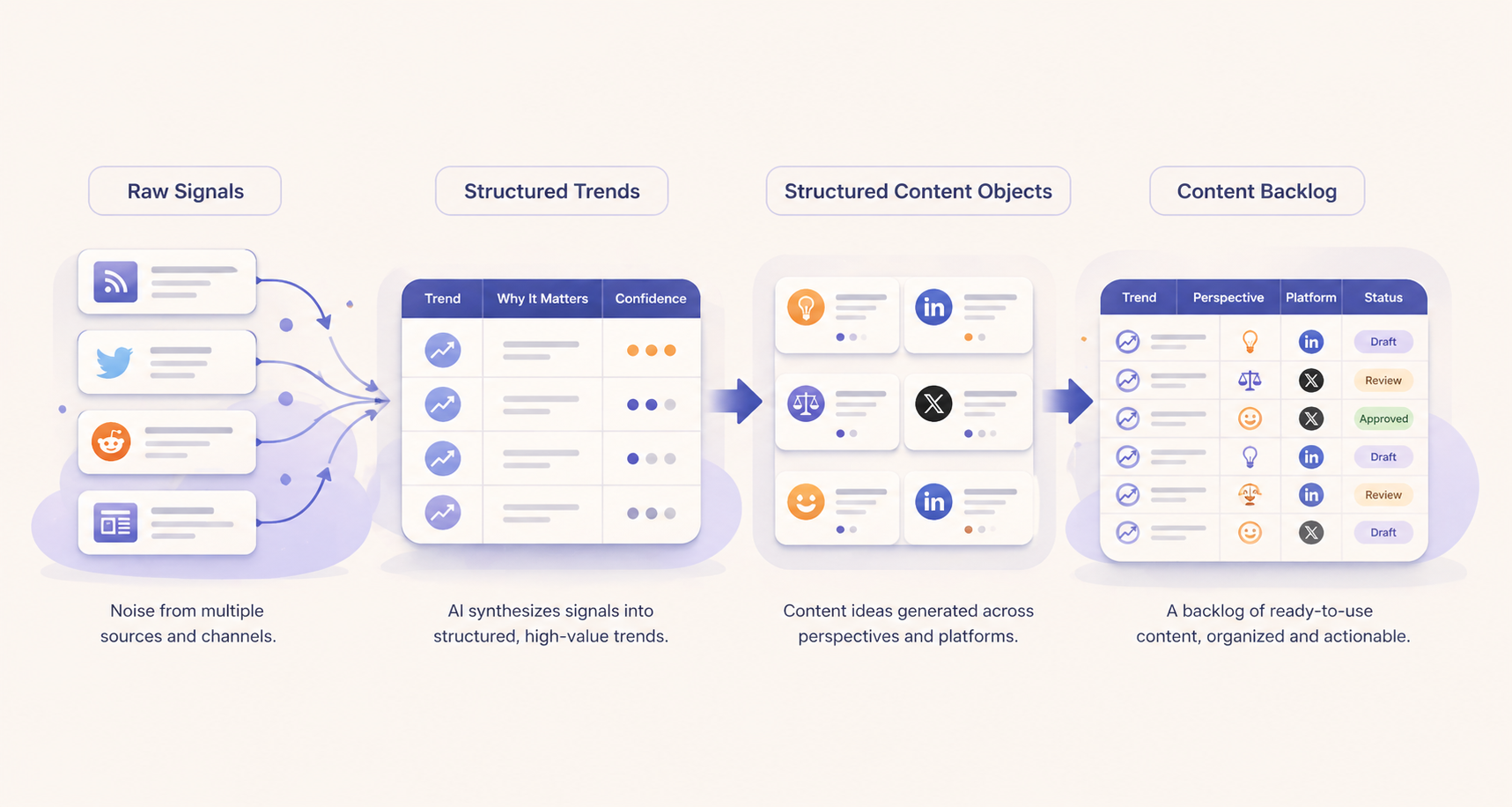
At a high level, the system looks like this:
Signals from the first workflow become structured trends. Those trends trigger a second workflow that produces multiple content starting points.
For each trend we generate:
- one enthusiastic take
- one contrarian take
- one humorous take
And each is adapted for:
- Twitter/X
That means one trend can produce six content starting points.
Three trends a day can seed a week’s worth of social ideas.
That is the leverage.
Step 1: Upgrade Insights into Structured Data
In the first post, our trend synthesis workflow ended in an email report. Useful for humans. Not particularly useful for downstream automation.
This time we change one thing: the model returns structured JSON instead.
User Message:
Given these article titles:
[rows]

json:
Instructions:
You are analyzing signals for a B2B marketing team.

Identify the top 3 trends.

Rules:
- focus on repeated patterns
- no isolated headlines
- concise fields
- valid JSON only
- no markdown
- do not wrap in ```json gates

Return ONLY structured JSON:
{
  "trends": [
    {
      "trend": "Rise of agentic AI workflows",
      "why_it_matters": "Marketing teams can automate research and campaign execution with human oversight.",
      "content_angle": "Create a post on how marketers can use AI agents without losing control.",
      "confidence": "high"
    },
    {
      "trend": "Search shifting toward answer engines",
      "why_it_matters": "SEO strategies may need to adapt for AI-mediated discovery.",
      "content_angle": "Write about optimizing content for generative search.",
      "confidence": "medium"
    }
  ]
}
Response Format:
json_objectThis is the key architectural move in the whole article.
AI output is no longer just something you read. It becomes something the next workflow consumes.
That is what makes this a content engine instead of a prompt trick.
A quick note on one-shot prompting
This is also a natural place to introduce one-shot prompting. Rather than only telling the model the schema you want, provide one high-quality example of the response.
Not many examples. One good one.
That small addition improves consistency dramatically. It is one of the first places prompt engineering starts looking less like prompting and more like interface design.
Step 2: Build the Trend Structuring Zap
Now we upgrade the second Zap from the previous post.
Workflow:
There is an important systems lesson hidden here.
My first version pulled the first batch of rows from the Signals sheet. It worked for a demo, but as the sheet grew, the workflow kept analyzing the same rows. The problem was not the model. It was state.
The fix was adding a processed_at field and only analyzing rows where it is blank. After trends are generated, the workflow loops through those source rows and marks them processed.
Simple change.
Huge difference.
It is the kind of small thing that makes a toy automation become a reliable workflow.
As a rule, I trust this principle almost everywhere: Do not rely on row order when workflow state will do.
Step 3: Build the Content Engine Zap
Now we add the second workflow.
Trigger:
New row in Trends sheetThat row is passed into OpenAI with a prompt that generates three perspectives and adapts each to two platforms.
User Message:
You are creating social content for a B2B technology audience.

Trend:
[trend]

Why it matters:
[why it matters]

json:
Instructions:
Generate:
- 1 enthusiastic take
- 1 contrarian take
- 1 humorous take

For EACH:
- create a LinkedIn version
- create a Twitter/X version

Return ONLY valid JSON using this exact structure:

{
  "content_ideas": [
    {
      "perspective": "Enthusiastic",
      "platform": "LinkedIn",
      "draft": "AI agents are moving from experiments into real workflows. The opportunity for marketing teams is not just efficiency, but entirely new operating leverage."
    },
    {
      "perspective": "Enthusiastic",
      "platform": "Twitter/X",
      "draft": "AI agents are leaving the demo phase and entering production. Marketing teams should pay attention now."
    },
    {
      "perspective": "Contrarian",
      "platform": "LinkedIn",
      "draft": "Hot take: most 'AI agent' strategies are still automation with better branding. The differentiator is not agents, it is thoughtful workflow design."
    },
    {
      "perspective": "Contrarian",
      "platform": "Twitter/X",
      "draft": "Contrarian take: most 'AI agents' today are glorified automations. Workflow design matters more than agent hype."
    },
    {
      "perspective": "Humorous",
      "platform": "LinkedIn",
      "draft": "At this rate your AI agent will soon need onboarding, quarterly goals, and maybe PTO. Humor aside, governance may become the real story in agent adoption."
    },
    {
      "perspective": "Humorous",
      "platform": "Twitter/X",
      "draft": "Soon your AI agent will want PTO and a promotion. But seriously, governance may be the real trend to watch."
    }
  ]
}

Rules:
- Return exactly 6 content ideas
- Match platform conventions:
  * LinkedIn = more thoughtful and developed
  * Twitter/X = shorter and punchier
- Keep drafts concise but publishable
- No markdown
- No commentary outside JSON
Response Format:
json_objectThose structured ideas get written into a Content Ideas sheet.
Workflow:
And that is the engine.
Trend in.
Multiple content starting points out.
Prompt Templates as Workflow Components
It helps to think of this less as “prompting for posts” and more as building reusable transformation logic.
A weak prompt says:
Write some social posts about this trend.A stronger template defines:
- audience
- perspective
- platform conventions
- tone constraints
- response structure
That is not clever prompting. That is specification.
And that distinction matters.
Prompts become more reliable when they behave like reusable components rather than improvised instructions. In practice, this often matters more than model choice.
Why Structure Matters
The most important output of this system is not the drafts themselves. It is the structure around them.
Those ideas are not just copy. They are structured content objects that can later be:
- filtered by platform
- scored for novelty
- routed into campaigns
- ranked for priority
- adapted into other formats
That is why structure matters more than any single draft.
The content is the surface layer. The reusable system underneath is the real asset.
What the Output Looks Like
The resulting content backlog can be very simple:
Some ideas will be weak. Some will be surprisingly strong. Some will trigger better ideas a human would not have reached as quickly. That is enough.
This system is not replacing editorial judgment. It is reducing blank-page friction and multiplying starting points. That alone creates real leverage.
Why This Matters for Marketing Teams
At first glance this looks like a content generation trick. I think it is better understood as an operating pattern.
Most teams do not need help producing more words. They need help producing more useful starting points with less effort and greater consistency.
That is what this system does.
And the implications go beyond social posts. Once AI is embedded inside workflows this way, it starts becoming part of how the team operates, not just another tool someone occasionally uses.
That is a much bigger opportunity.
Where This Can Go Next
Once this works, there are plenty of ways to extend it.
You could branch content by trend type:
Technical trend → thought leadership

Cultural trend → humor

Strategic trend → newsletter ideas
You could add scoring for novelty or audience fit. You could build a lightweight editorial queue. You could transform strong outputs into email hooks, meme concepts, or video scripts.
Once you start seeing ideas as transformations, extension paths start appearing everywhere.
There is also a caution worth mentioning
Automation scales mistakes as efficiently as output.
Generating drafts is one thing. Letting AI publish directly on your behalf is something else entirely. Very different risk profile.
That is where the next post begins.
Because before you let AI touch your social stream, we need to talk about approvals, control, and why your AI probably should not be allowed to post without you.
Join the Conversation
No comments here by design. Continue the discussion on social.