
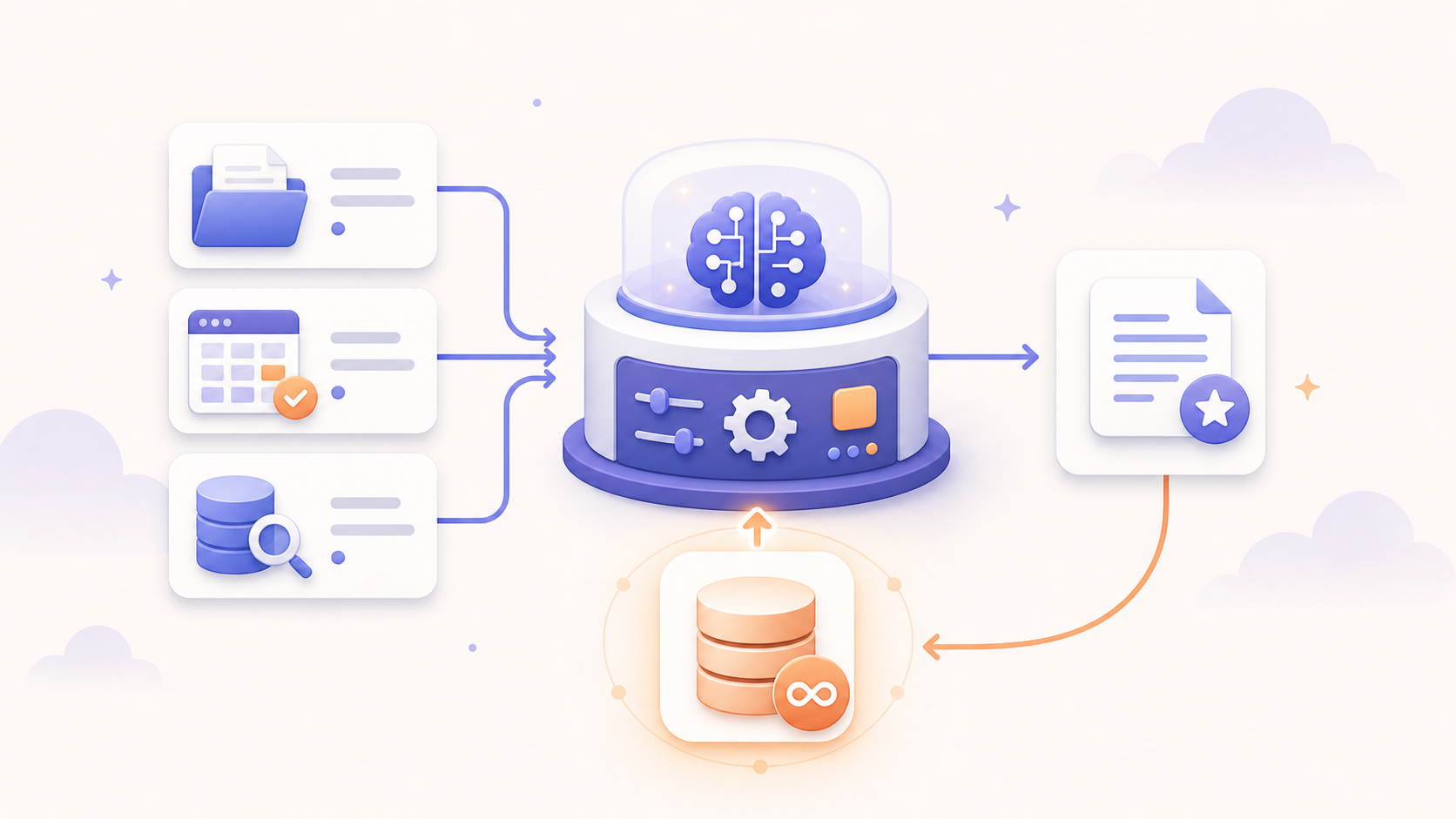
Your AI Workflow Has Amnesia: Adding Memory to Your Content Engine
Most AI content can be easily spotted after a few seconds. The post is clean. The structure is reasonable. The tone is polished enough. But it could have come from anyone. LLMs are trained to select the most probable next token, so it is no wonder that they produce vague and generic content.
That is the problem with a lot of AI-assisted content systems. They can produce output quickly, but they do not automatically preserve a point of view. They do not know what you said last week, what campaign you are currently running, or which angles have already been explored. Unless you give them context every time, they generate from the current record and a generic sense of what the internet sounds like.
That is not enough if the goal is to help people understand how you think.
Earlier in this series, we built a workflow that could find trends, turn them into platform-specific drafts, route those drafts through human approval, create images, and queue finished assets for distribution. In the previous post, one approved idea became a production-ready social asset with copy, visual direction, generated media, and Buffer scheduling.
That is useful, but the system still has a limitation: it does not remember.
Every new generation starts too close to zero. It does not automatically load the brand voice. It does not know the active campaign unless you pass that in. It does not search previous posts before writing another one. The workflow can execute, but it cannot yet carry context forward.
So in this post, we are going to add memory.
The Shift: From Stateless Workflows to Context-Aware Systems
A stateless workflow starts from scratch every time.
That is not always bad. Stateless workflows are simple, predictable, and easy to debug. The first few workflows in this series benefited from that simplicity because every step was visible: collect the signal, generate the draft, approve the post, create the asset, queue the result.
But as the system becomes more useful, the limitations become more expensive.
Without memory, the workflow can:
- repeat similar ideas too often
- drift away from the brand voice
- ignore recent campaign themes
- generate posts that look fine in isolation but weak as part of a broader strategy
A single post can be well-written and still be strategically wrong. It might repeat something you already said, use a tone that does not fit the current campaign, or sound like general AI advice instead of your specific operating point of view.
Memory helps solve that.
The basic pattern is:
- retrieve context
- generate with context
- store useful output
Before the system generates something new, it retrieves the context that should shape the answer. After a post is published, it stores that post in a way the system can retrieve later.
That is the beginning of a memory loop.
There is a technical term for part of this pattern:
Retrieval-augmented generation or RAG.
In plain language, RAG means the workflow looks up relevant information before asking the model to generate. Instead of expecting the model to know your company, your campaign, and your past content from its training data, you retrieve that information from systems you control and include it in the prompt.
The model is still generating. It is just no longer generating from a blank slate.
The Memory Model
For this first version, we will keep the memory layer intentionally small.
The workflow will retrieve three kinds of context:
| Context | Scope | Source | Why it matters |
|---|---|---|---|
| Brand guide | Static | Google Drive | Keeps the writing aligned to the company voice |
| Active campaign | Semi-static | Airtable | Keeps the post connected to the current priority |
| Similar past posts | Dynamic | Pinecone | Helps the model avoid repetition and maintain continuity |
That is enough to demonstrate the pattern without making the workflow too complicated.
The brand guide changes slowly. The active campaign changes occasionally. Similar posts change every time new work is published and indexed. Those different scopes matter because they should not be retrieved the same way.
A brand guide does not need semantic search. The active campaign does not need a vector database. Similar posts usually do.
The workflow now has two connected parts:
- Content Queue = state machine
- Published Posts = indexing workflow
The Content Queue table remains the active workflow object. It tracks drafts, review state, image generation, scheduling, and publication. The Published Posts table becomes the durable memory table. It stores finished posts and marks whether each one has been indexed into Pinecone.
What We Are Building
At a high level, the workflow looks like this:
The system will:
- Listen for changes to the
Content Queuetable. - Route the record based on
Status. - If
Status = IN_PROGRESS, retrieve context and generate a better draft. - If
Status = IN_REVIEW, send the draft through Slack approval. - If
Status = APPROVED, generate the image asset. - If
Status = SCHEDULED, queue the post in Buffer, mark the recordPUBLISHED, and create aPublished Postsrecord. - Separately, listen for
Published Postsrecords whereIndexedis unchecked, embed them, store them in Pinecone, and setIndexed = true.
The status values are:
IN_PROGRESSIN_REVIEWAPPROVEDREJECTEDSCHEDULEDPUBLISHED
The important distinction is that approval happens after context-aware generation, not before it. IN_PROGRESS means the content item is ready for memory-aware drafting. IN_REVIEW means the generated draft is ready for human judgment. APPROVED means the content can move into production.
That keeps the workflow honest. Memory increases capability, but it does not remove the approval boundary.
Why Memory Changes the Draft
Before we get into tables and nodes, it helps to see what changes.
Without memory, a prompt might produce something like this:
AI can help marketing teams save time by automating repetitive tasks. By using AI tools, teams can generate more content, improve productivity, and focus on strategy.
There is nothing technically wrong with that. It is also the kind of paragraph that could appear in almost any AI marketing post.
With memory, the workflow has more to work with:
- the brand guide says to avoid hype and frame AI as workflow design
- the active campaign says the current theme is moving from task automation to systems thinking
- similar posts show that we already covered distribution and approval gates
Now the model has a better chance of producing something like:
Most teams do not need more AI-generated content. They need a content system that remembers what it already said, what campaign it is supporting, and where human judgment still belongs.
That is not just a better sentence. It is a better operating behavior. The workflow is no longer only transforming an input into an output. It is using context to decide what kind of output would actually fit.
There is still risk here. Retrieval can reinforce stale patterns. It can overfit to old posts. It can give the model false confidence if the retrieved examples are weak. That is why we keep the human review step in place and make the retrieved context visible in the review message.
Set Up the Airtable Tables
We will use two Airtable tables.
The first is the existing Content Queue table from earlier in the series. In the previous post, that table already tracked the content review process and production fields like Image Prompt, Visual Concept, and Generated Image. In this version, it also acts as the state machine.
Make sure Content Queue has these fields:
| Field | Type | Purpose |
|---|---|---|
| Title | Text | Short working title |
| Trend | Long text | Source trend, signal, or idea |
| Platform | Single select | LinkedIn, Twitter/X, or another channel |
| Perspective | Text | Angle, take, or editorial perspective |
| Draft | Long text | Current generated draft |
| Status | Single select | Workflow state |
| Reviewer Notes | Long text | Human feedback |
| Campaign | Linked record | Link to Campaigns |
| Context Notes | Long text | How the model used retrieved context |
| Repetition Risk | Single select | Low, Medium, or High |
| Image Prompt | Long text | Prompt used to generate the image |
| Visual Concept | Long text | Human-readable framing for the image |
| Generated Image | Attachment | Final or draft visual asset |
| Published Posts | Linked record | Link to Published Posts |
The second table is Published Posts.
This is the memory table. It should represent content that has already moved through production and is stable enough to influence future work.
Add these fields:
| Field | Type | Purpose |
|---|---|---|
| Source Record | Linked record | Link back to Content Queue |
| Platform | Single select | Channel |
| Topic | Text | Main subject |
| Angle | Text | Position or editorial angle |
| Campaign | Linked record | Link to Campaigns |
| Content | Long text | Final post |
| Summary | Long text | Short memory |
| Published At | Date | Publish date |
| Indexed | Checkbox | Has this been inserted into Pinecone? |
When the scheduling branch creates a Published Posts record, set Indexed = false.
That tells the indexing workflow there is new memory to process.
Add the Context Sources
Now we need the three context sources.
Brand Guide: Static Context
Create a Google Doc called Brand and Voice Guide, and add sections like this:
# Brand and Voice Guide

## Audience

Growth-stage companies trying to operationalize AI without losing human judgment, trust, or craft.

## Voice

Clear, practical, systems-minded, calm, and experienced. The writing should feel like a thoughtful operator explaining how to make an AI workflow useful in the real world.

## Use

- Plain language before technical terms
- Concrete examples
- Operational framing
- Systems metaphors
- Calm confidence

## Avoid

- AI hype
- Generic productivity language
- Overpromising autonomy
- Engagement bait
- Overly futuristic imagery

## Example that sounds right

Most teams do not have an AI problem. They have a workflow design problem.

## Example that sounds wrong

Unlock limitless AI-powered growth with next-gen automation.
The important design choice is that the brand guide lives outside the automation. It should be a document a person can read, edit, and improve over time. The workflow will retrieve it when needed, but Google Drive remains the source of truth.
Active Campaign: Semi-Static Context
Create an Airtable table called Campaigns, and add these fields:
| Field | Type | Purpose |
|---|---|---|
| Name | Text | Campaign name |
| Active | Checkbox | Current campaign |
| Audience | Text | Target reader |
| Theme | Text | Main idea |
| Key Messages | Long text | Message points |
| CTA | Text | Desired action |
| Start Date | Date | Campaign start |
| End Date | Date | Campaign end |
Create one active campaign to start:
Name: AI Automation Series
Active: checked
Audience: Marketing operators and business leaders exploring practical AI workflows
Theme: Move from task automation to systems thinking
Key Messages:
- AI becomes useful when embedded in workflows
- Human judgment remains part of production systems
- The system matures from signal capture to generation, approval, distribution, memory, and improvement
CTA: Read the next post in the series
The active campaign belongs in Airtable because it is operational context, not long-form guidance. A campaign is structured, time-bound, and easy to filter. In this first version, the workflow will use the one campaign where Active is checked.
Similar Posts: Dynamic Context
Similar posts come from Pinecone.
Each Published Posts record should eventually become a searchable memory. The text you embed can stay compact:
Topic: {{Topic}}
Angle: {{Angle}}
Content: {{Content}}
The metadata can include:
{
  "platform": "LinkedIn",
  "topic": "AI governance",
  "angle": "Contrarian",
  "campaign": "AI Automation Series",
  "summary": "This post highlights the importance of effective workflow design over simply adopting AI agents for achieving operational efficiency.",
  "published_at": "2026-05-26",
  "airtable_record_id": "rec123"
}
Pinecone is useful here because similarity is not the same thing as a matching tag. A new post about “AI workflow memory” might be related to earlier posts about approval, distribution, or prompt context even if the exact words do not match. The vector search gives the workflow a way to retrieve related work by meaning.
Build the Content Queue State Machine
This is the point in the series where the orchestration tool needs to change.
The earlier workflows were straightforward enough to build in Zapier. That was the right starting point. Zapier is approachable, familiar, and excellent for linear automations: when this happens, do that, then do the next thing.
This workflow is different. We are no longer building a simple chain. We are building a state machine that listens to a record, checks its status, branches into different paths, retrieves context from several systems, sometimes waits for human approval, and then writes state back to Airtable.
That is why we are moving this part of the system to n8n.
n8n gives us a few advantages:
- branching logic is easier to see and maintain
- state-machine routing fits naturally with the Switch node
- Code nodes make it easier to normalize data between branches
- AI and vector database nodes can sit inside the same workflow as ordinary SaaS tools
- self-hosting is available if you want more control over execution and data handling
There are tradeoffs. n8n has a steeper learning curve than Zapier. It exposes more of the data shape, which means you sometimes need to understand items, arrays, expressions, and node outputs more precisely. If you self-host it, you also own more of the operational surface.
For this stage of the content engine, that extra control is worth it. Memory-aware workflows are not just “do step A, then step B.” They need routing, retrieval, transformation, and explicit state transitions.
The main n8n workflow listens to Content Queue.
Start with an Airtable Trigger pointed at Content Queue. Send that record into a Switch node, and configure the Switch node to branch on Status. The branches are IN_PROGRESS, IN_REVIEW, APPROVED, and SCHEDULED.
The Switch node is the heart of the state machine. Each branch has a clear entry state and a clear exit state:
IN_PROGRESSends by settingStatus = IN_REVIEWIN_REVIEWends by settingStatus = APPROVEDorStatus = REJECTEDAPPROVEDends by settingStatus = SCHEDULEDSCHEDULEDends by settingStatus = PUBLISHEDand creating aPublished Postsrecord
This is the same operational idea we used in the previous post: workflow state controls execution. The system should not inspect every record and guess what to do. It should respond when a record reaches the next meaningful state.
IN_PROGRESS: Generate With Memory
The IN_PROGRESS branch retrieves context and improves the draft.
First, retrieve the brand guide from Google Drive. Use the Google Drive node to download the document and convert it to text or Markdown. Then use a small Code node to read the downloaded binary file into a string. That string becomes brand_guide in the generation prompt.
n8n’s Google Drive node supports file download operations and Google file conversion, which makes it practical to keep the guide as a real Google Doc instead of hardcoding it into the workflow. See the Google Drive node documentation.
Next, fetch the active campaign from Airtable:
Node: Airtable
Operation: Search records
Table: Campaigns
Filter By Formula: {Active}
Limit: 1
Then search Pinecone for similar posts:
Node: Pinecone Vector Store
Mode: Get Many
Index: ai-automation-posts
Prompt: {{Draft}}
Top K: 3
The workflow then looks up each returned airtable_record_id in Airtable and aggregates the three summaries into a single field such as similar_posts.
That aggregation matters. Pinecone returns multiple items, and n8n will run downstream nodes once per item unless you combine them. The Aggregate node or a Code node can turn three retrieved posts into one prompt-ready text block.
The prompt can use this shape:
You are helping a marketing team generate content for an AI automation series.

Use the context below to generate a fresh platform-specific draft.

Brand Guide:
{{brand_guide}}

Active Campaign:
{{campaign}}

Similar Posts:
{{similar_posts}}

Current Record:
{{current_record}}

Instructions:
- Follow the brand guide.
- Stay aligned to the active campaign.
- Use similar posts as reference, not source material to copy.
- Avoid repeating the same angle if similar posts already covered it.
- Preserve the core idea from the current record.
- Make the output feel specific, not generic.
- Return only valid JSON.
- repetition_risk is one of: Low | Medium | High.

Return this exact JSON shape:
{
  "platform": "LinkedIn",
  "topic": "Short topic",
  "angle": "Short angle",
  "context_notes": "One or two sentences describing which context mattered",
  "draft": "Final draft text",
  "repetition_risk": "Low"
}
Then update the same Content Queue record:
Draft = {{draft}}
Context Notes = {{context_notes}}
Repetition Risk = {{repetition_risk}}
Status = IN_REVIEW
Memory should guide generation, not replace judgment. The point is not to make the model copy old posts. The point is to give it enough context to create something fresh that still belongs to the same system.
Context without creativity becomes repetition. Creativity without context becomes generic output. The workflow needs both.
IN_REVIEW: Keep Human Judgment in the Loop
The IN_REVIEW branch sends the generated draft to Slack.
Include the fields that help the reviewer judge how the model used memory:
- draft text
- platform
- active campaign
- repetition risk
- context notes
Example Slack message:
New memory-aware draft ready for review

Platform:
LinkedIn

Campaign:
AI Automation Series

Draft:
Most teams do not need more AI-generated content...

Context Notes:
Uses the active campaign and shifts away from similar distribution posts.

Repetition Risk:
Low
If the reviewer approves the draft, set the Status to APPROVED. If they reject it, set the Status to REJECTED.
This is where the trust model stays intact. Memory improves the draft, but a human still decides whether the output should move forward.
APPROVED: Generate the Production Asset
The APPROVED branch turns approved copy into a production asset.
This continues the pattern from the previous post. The approved draft becomes source material for a visual concept, an image prompt, and a generated image.
The final update should set:
Image Prompt = generated prompt
Visual Concept = generated concept
Generated Image = uploaded image attachment
Status = SCHEDULED
At this point, the record contains the core production chain: source idea, memory-aware copy, review state, visual direction, and generated asset.
SCHEDULED: Queue the Post and Create Memory
The SCHEDULED branch routes the post to Buffer and creates the Published Posts record. We can add a switch on Platform, and ensure the post is scheduled into the platform-specific queue, “LinkedIn” or “Twitter/X”. Then we mark the Content Queue as PUBLISHED and create the new Published Posts record.
The record should include:
Source Record = Content Queue record
Content = Draft
Platform = Platform
Topic = Trend
Angle = Perspective
Indexed = false
Strictly speaking, Buffer queueing is not the same as the post being live. In this first version, PUBLISHED means the workflow has handed the asset to the publishing queue and created durable memory. If you need a more exact publishing lifecycle later, you can split that into QUEUED, PUBLISHED, and INDEXED. For now, the simpler state machine is easier to build and reason about.
Build the Published Posts Indexer
The second n8n workflow listens to Published Posts. Start with an Airtable Trigger on the Published Posts table, then add an IF node that only continues when Indexed is unchecked.
After that, add a second IF node for Summary. If Summary already exists, format the existing summary for embedding. If it is empty, call OpenAI to summarize the post and then format the generated summary. Both paths should rejoin into the same Pinecone insert step. Once Pinecone accepts the document, update the Airtable record and set Indexed = true.
The Summary branch is worth normalizing. Whether the summary came from Airtable or OpenAI, the next node should receive the same shape:
{
  "summary": "One-sentence summary",
  "text": "Topic: ...\nAngle: ...\nContent: ...",
  "platform": "LinkedIn",
  "topic": "AI governance",
  "angle": "Contrarian",
  "campaign": "AI Automation Series",
  "published_at": "2026-05-26",
  "airtable_record_id": "rec123"
}
That makes the Pinecone insert step straightforward:
Node: Pinecone Vector Store
Operation: Insert Documents
Data Loader: Default Data Loader
Embeddings: OpenAI Embeddings
n8n vector store nodes work with sub-nodes. For this workflow, the Pinecone Vector Store node handles the insert, the Default Data Loader supplies the text and metadata, and the Embeddings OpenAI node creates the vectors. See the Pinecone Vector Store node documentation.
Once the insert succeeds, update the Airtable record Indexed = true.
At a practical level, the memory write takes a published post, turns it into a compact summary and embedding text, inserts that representation into Pinecone, and then marks the Airtable record as indexed.
That is enough for the first version. The system can now retrieve published work by meaning, not only by exact text or table filters.
The Full Workflow
Here is the complete shape.
The Content Queue workflow starts when Airtable reports a changed content record. A Switch node reads the Status field and routes the record to the correct branch. The IN_PROGRESS branch retrieves the brand guide, active campaign, and similar posts before generating a context-aware draft and setting the record to IN_REVIEW. The IN_REVIEW branch sends the draft to Slack and ends in either APPROVED or REJECTED. The APPROVED branch generates the image asset and sets the record to SCHEDULED. The SCHEDULED branch queues the post in Buffer, marks the content record PUBLISHED, and creates a Published Posts record with Indexed unchecked.
The Published Posts indexing workflow starts when Airtable reports a changed published post. It only continues when Indexed is unchecked. It summarizes the post if needed, formats the embedding payload, inserts the record into Pinecone, and then marks Indexed as checked.
That design gives each system a clear job. Content Queue owns active workflow state. Published Posts owns durable memory. Google Drive stores the static brand context. Airtable Campaigns stores semi-static campaign context. Pinecone stores dynamic semantic memory.
What We Just Built
We added a memory layer to the content engine.
The system can now:
- start from
Content Queuerecords markedIN_PROGRESS - load brand guidance from Google Drive
- retrieve the active campaign from Airtable
- search similar posts by meaning in Pinecone
- generate a draft with context
- route that draft through human review
- generate the production asset after approval
- create a durable
Published Postsmemory record - embed published posts for future retrieval
Before this post, the system could move from signal to insight, content, review, and distribution. Now it can close the loop by turning finished work into memory that future drafts can retrieve.
That does not make it fully autonomous. It does not decide what matters, judge performance, or know which examples should be trusted. It does begin to behave less like a disconnected chain of automations and more like a system that understands its own history.
What Comes Next
Memory creates the next question:
How does the system know what worked?
Right now, similar posts are available as context, but the system does not know which ones performed well. It can retrieve related content, but it cannot tell whether those examples should be imitated or avoided.
That is where feedback comes in. The next step is to collect performance signals like likes, comments, clicks, and engagement. Those results can help the system identify stronger patterns, improve retrieval, and move from memory toward improvement. This is called “closing the loop.”
The goal is not to remove the human.
The goal is to move the human higher in the architecture.
At first, the human writes.
Then the human approves.
Then the human supervises.
Eventually, the human governs a system that can observe its own results and improve the work it produces.
Memory is not autonomy. Memory is the context layer that makes better judgment possible.
Join the Conversation
No comments here by design. Continue the discussion on social.