
From One Approved Idea to Production-Ready Social Assets
Most teams underuse their best ideas.
They find a trend, write a post, publish it once, and move on. That feels productive because something shipped, but it leaves most of the value trapped in a single artifact. A strong idea should become source material that can be transformed into multiple useful outputs without forcing the team to rebuild the work from scratch each time.
That is the shift in this post. Earlier in the series, the system gathered signals, turned them into insights, generated platform-specific drafts, and introduced approval before anything moved forward. Those steps made AI useful inside the workflow. Now we are going to make it produce assets that are ready for distribution.
This is where the system starts to cross the line from assistive content generation into production output. The goal is not to create a fully autonomous campaign machine. The goal is to take one approved idea and turn it into a complete, publishable social asset with copy, visual direction, generated media, channel routing, and queueing.
The Production Step: Approved Content Becomes Source Material
Once content is approved, it becomes source material for downstream production. That is a practical threshold. The system can now use the approved draft to create visual concepts, image prompts, generated assets, and scheduled posts without asking a human to manually repackage the idea for every channel.
This matters because leverage does not come from generating a draft. It comes from turning a good input into a series of useful outputs while preserving the context that made the input valuable. A content workflow becomes more powerful when the record contains not only the draft, but also the state, assets, channel, and distribution history attached to that idea.
The previous post handled the approval boundary. This post focuses on what becomes possible after that boundary exists. We are going to use approved content as the input for a small production pipeline.
What We Are Building
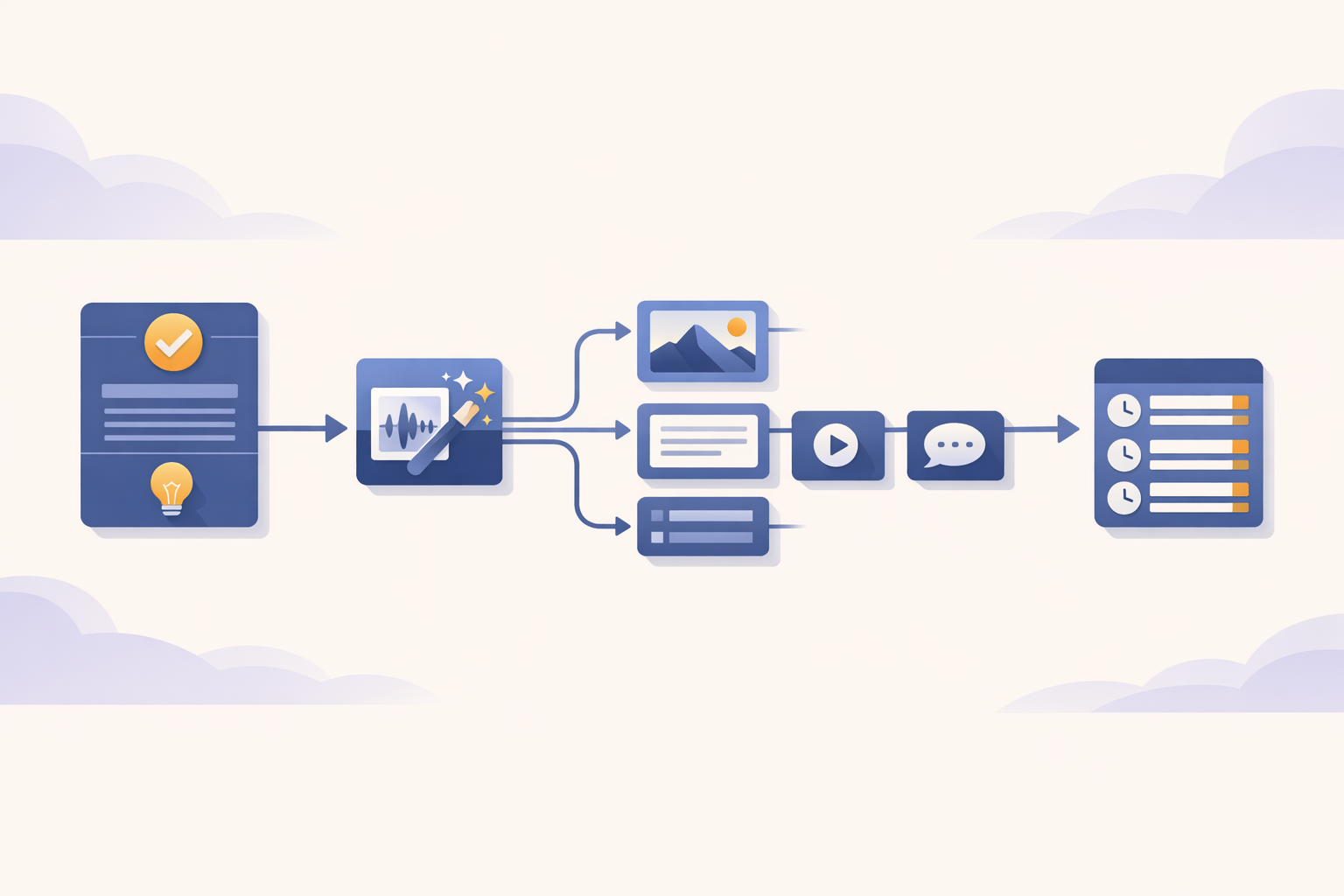
Here is the workflow:
At a high level:
- Airtable stores approved platform-specific content.
- Zapier watches for records ready for distribution.
- OpenAI generates a visual concept and image prompt.
- OpenAI Image Generation creates the image asset.
- Airtable stores the generated prompt, visual concept, and image.
- Zapier routes the post to the correct Buffer channel.
- Buffer queues the post for publication.
This adds two important production capabilities: multimodal asset generation and external distribution. We are no longer stopping at text drafts inside an internal workspace. The workflow now produces a visual asset, attaches it to the source record, and moves the final post into a publishing queue.
The tool stack stays intentionally simple. Airtable remains the operational table, Zapier handles routing, OpenAI creates the visual concept and image, and Buffer handles social queueing. That is enough to bridge the gap between AI-assisted drafting and real campaign output without turning the system into something too complex to understand.
Step 1: Extend the Airtable Table
In the previous post, the Airtable table tracked the content review process. It included fields like Title, Trend, Platform, Perspective, Draft, Status, and Reviewer Notes. For this workflow, the same table needs to track the production assets created after approval.
Add these fields:
| Field | Type | Purpose |
|---|---|---|
| Image Prompt | Long text | The generated prompt used to create the image |
| Visual Concept | Long text | The human-readable creative framing |
| Generated Image | Attachment | The image generated by the workflow |
| Buffer Status | Single select | Tracks whether the post has been queued |
This is a small schema change, but it changes what the record represents. The Airtable record is no longer just a draft waiting for review. It becomes the operating object for a piece of content: source insight, approved copy, platform, creative direction, generated media, and distribution status all connected in one place.
That connection is where operational value starts to compound. A person can inspect the record and understand what was approved, what was generated, where it is going, and whether it has been queued. The system can also use those same fields to decide what should happen next.
Step 2: Create a Ready for Distribution View
Next, create a new Airtable view:
Ready for DistributionFilter it to show records where:
Status = APPROVED AND Generated Image is emptyThis view becomes the operational trigger for the production workflow. The Zap does not need to inspect every record in the table or guess which drafts are ready. It watches a view that only contains approved records that still need media production.
That is a simple but important pattern. Instead of using automation to chase activity, you use workflow state to control execution. When a record enters the right state, the production process starts; when it does not, nothing happens.
Earlier in the series, Zapier mostly responded to new rows or incoming data. In this version, it responds to a more meaningful signal: a content record has reached the next stage of work. That is a step toward orchestration, because the workflow is now driven by state instead of raw activity.
Step 3: Generate the Visual Concept and Image Prompt
Once an approved record appears in the Ready for Distribution view, the Zap begins with text generation. The approved draft becomes the source input, and OpenAI returns two structured fields: image_prompt and visual_concept. These fields serve different users inside the workflow, so they should not be collapsed into one output.
The image prompt is written for the image model. It should describe the subject, composition, visual style, lighting, and mood clearly enough to produce a useful image. The visual concept is written for the human operator, giving a concise explanation of the creative direction behind the asset.
Example output:
{
  "image_prompt": "A realistic editorial-style image of a marketing operations workspace with one approved content record expanding into multiple finished assets across a dashboard. The scene should feel practical, organized, and production-ready, with visible cues for copy, image generation, scheduling, and channel routing. Clean lighting, modern software environment, grounded business context, no text overlays.",
  "visual_concept": "One approved idea becomes a coordinated production asset instead of a one-off post."
}
Here is the prompt structure I used:
You are an AI creative strategist helping a marketing team transform approved social media posts into production-ready visual assets.

Your task is to generate:
1. A detailed image generation prompt.
2. A concise visual concept for the human operator.

The generated assets should feel:
- clear
- credible
- platform-aware
- visually specific
- appropriate for professional marketing content
- aligned with the approved message

Adapt the visual style to the content:
- Operational insights should feel grounded and practical.
- Strategic points should feel polished and editorial.
- Contrarian perspectives should feel clear and specific, not exaggerated.
- Light humor is acceptable when it supports the approved message.

The image prompt should:
- describe composition, subject matter, style, lighting, and mood
- be detailed enough for high-quality AI image generation
- avoid mentioning text overlays unless essential
- avoid generic "AI futuristic" clichés unless directly relevant
- avoid engagement bait, hype, or visual metaphors that distort the message

The visual concept should:
- explain the core visual metaphor
- be concise and easy for a marketer to understand
- clarify why the image supports the approved content

Platform:
{{Platform}}

Perspective:
{{Perspective}}

Approved Draft:
{{Draft}}

Return ONLY valid JSON matching this schema:

{
  "image_prompt": "string",
  "visual_concept": "string"
}
After generating the structured JSON, update the Airtable record with the Image Prompt and Visual Concept fields. This makes the production logic visible before the final image is created. If the image misses the mark later, the team can inspect the prompt that caused it instead of treating the generated asset as an unexplained output.
Prompts are operational assets once they produce downstream work. They should not disappear inside a Zapier step where nobody can see or improve them. Store them, review them, and refine them as the team learns which creative directions produce useful assets.
Step 4: Generate the Image
Next, use the generated image_prompt as the input to OpenAI Image Generation. For this stage of the workflow, keep the image step narrow. Generate one image from the approved draft and the generated prompt, then save the result back to the record.
Node = OpenAI > Generate An Image
Prompt = generate image from: {{image_prompt}}
Model = gpt-image-1.5
It is easy to overbuild this step. You could generate multiple options, add a second approval process, score each image, regenerate weak outputs, or ask another model to critique the composition. Those improvements may become useful later, but they are not necessary to prove the production pattern.
Right now, the important sequence is simple: Approved text becomes a visual concept which is the basis of generated media.
That sequence creates a working bridge from content approval to asset production. The team is no longer asking AI only to assist with wording. It is using AI to create a finished media component that can move into distribution.
Step 5: Save the Generated Image Back to Airtable
Once the image is generated, save it back to the same Airtable record:
Generated Image = {{OpenAI generated image}}
Buffer Status = NOT_SCHEDULED
This is where the workflow starts to feel different. The record now contains the full production chain from source insight to approved copy to visual concept to generated image. That makes the output inspectable instead of scattered across separate tools.
The practical value is not just that an image exists. The value is that the image remains connected to the content and workflow state that produced it. A team can look at the record and understand the asset in context, which makes it easier to review, reuse, improve, or troubleshoot later.
Step 6: Route the Post to the Right Buffer Channel
Now the workflow needs to queue the post. Since the Airtable table already includes a Platform field, use that field to route the record to the correct Buffer channel. The simplest approach is Zapier Paths.
Platform = LinkedIn → Buffer LinkedIn Channel
Platform = Twitter/X → Buffer Twitter/X Channel
In the LinkedIn path:
Buffer → Add to Queue
Channel = LinkedIn
Text = Draft
Image = Generated Image
In the Twitter/X path:
Buffer → Add to Queue
Channel = Twitter/X
Text = Draft
Image = Generated Image
Use Add to Queue instead of Publish Immediately. Queueing turns the workflow into a production system without forcing it to control timing. Buffer can hold the finished asset in the right channel, while the team still controls cadence through the publishing queue.
That distinction matters because production output is not the same as instant publication. The workflow should create the finished asset and place it where it can be used. The publishing schedule can still reflect campaign timing, audience behavior, and team judgment.
Step 7: Update Distribution Status
After the Buffer step succeeds, update the Airtable record again:
Buffer Status = SCHEDULEDThis closes the production loop. The system has generated content, used approval as the starting point, created a visual asset, queued the post, and recorded the distribution state. That is a complete workflow, not just a drafting assistant.
It is still intentionally limited. It does not optimize the campaign, measure performance, learn from engagement, or decide what to publish next. But it does produce a real external asset from a previously internal AI workflow, which is the milestone this step is meant to reach.
What We Just Built
At the end of Post 2, the system could generate content drafts. At the end of Post 3, the system could hold those drafts for review and approval. At the end of this post, the system can turn approved content into public-facing assets that are ready for distribution.
That is the beginning of media operations. The important point is not that AI can make images; it is that approved workflow state can now produce downstream assets. Once the system knows what has been approved, where it belongs, and what still needs to happen, it can help move work from draft to production.
This design matters because it keeps the work connected to its source. The approved copy, visual concept, image prompt, generated media, channel, and distribution status all live on the same operational record. That is what lets a team reuse good ideas without losing track of context, ownership, or channel fit.
Where This Can Extend
This version is intentionally simple. It proves that one approved idea can become a production-ready social asset with generated media and scheduled distribution. Once that pattern works, the system can extend into more formats, stronger controls, and better feedback loops.
Useful next improvements include:
- generating multiple image options
- adding a media approval step when the channel or topic requires it
- storing prompt templates
- adding image quality scores
- routing risky content back to human review
- regenerating weak images automatically
- tracking which templates perform best
- measuring engagement after publication
- creating ads, landing page variants, email snippets, presentation slides, or campaign briefs from the same approved source
Those additions belong later because they build on the production pipeline rather than replacing it. The system now includes trend discovery, content generation, human approval, visual concept generation, image generation, asset storage, platform routing, Buffer scheduling, and status tracking. That is useful, but it is also more operational complexity than a person will want to coordinate manually forever.
The next stage is to move more of that coordination burden into the system. The human does not disappear; the human moves higher in the architecture. Instead of manually turning every approved idea into every asset, the human defines standards, approves patterns, monitors performance, and intervenes when the system is uncertain.
What Comes Next
Now that the system can distribute content, the next problem becomes memory. Without memory, the system can repeat itself, reuse the same angle too often, or create posts that look fine in isolation but feel stale across a campaign. Production output creates value, but it also creates history that the system should be able to learn from.
That is the next maturity step. In the next post, we will move from workflow automation toward the first version of an AI marketing agent. The system will not only react to the current record; it will begin using context, history, and memory to make better decisions.
Join the Conversation
No comments here by design. Continue the discussion on social.